Monday, June 22, 2020

Five Highlights From the 2020 Apple WWDC Keynote


I’ve written several posts on this blog about Apple, my love of the company’s products, and the new streaming service Apple TV+. 

For me, each new announcement and presentation is something akin to Christmas Day. 


Because of COVID-19 global pandemic, Apple changed its annual World Wide Developers to a “virtual” gathering online — making the conference free this year. 

Because the company’s keynote is a stage-based production, I wasn’t sure how this year’s event would feel. 

As many pundits Tweeted during the keynote (including myself), the production value on the event was pretty slick, and very informative. 


Sadly, there weren’t any hardware reveals or teases this year (I was excited to see a redesigned iMac), but there were a number of details on upcoming software updates for iOS 14, iPadOS 14, TVOS 14, and macOS Big Sur. Along with the enhancements to the core software, Apple outlined its desktop/laptop transition from Intel’s x86 processors to their own custom processors, dubbed “Apple Silicon.”  

Here are my five favorite highlights from the event: 

WIDGETS ON THE HOME SCREEN IN IOS
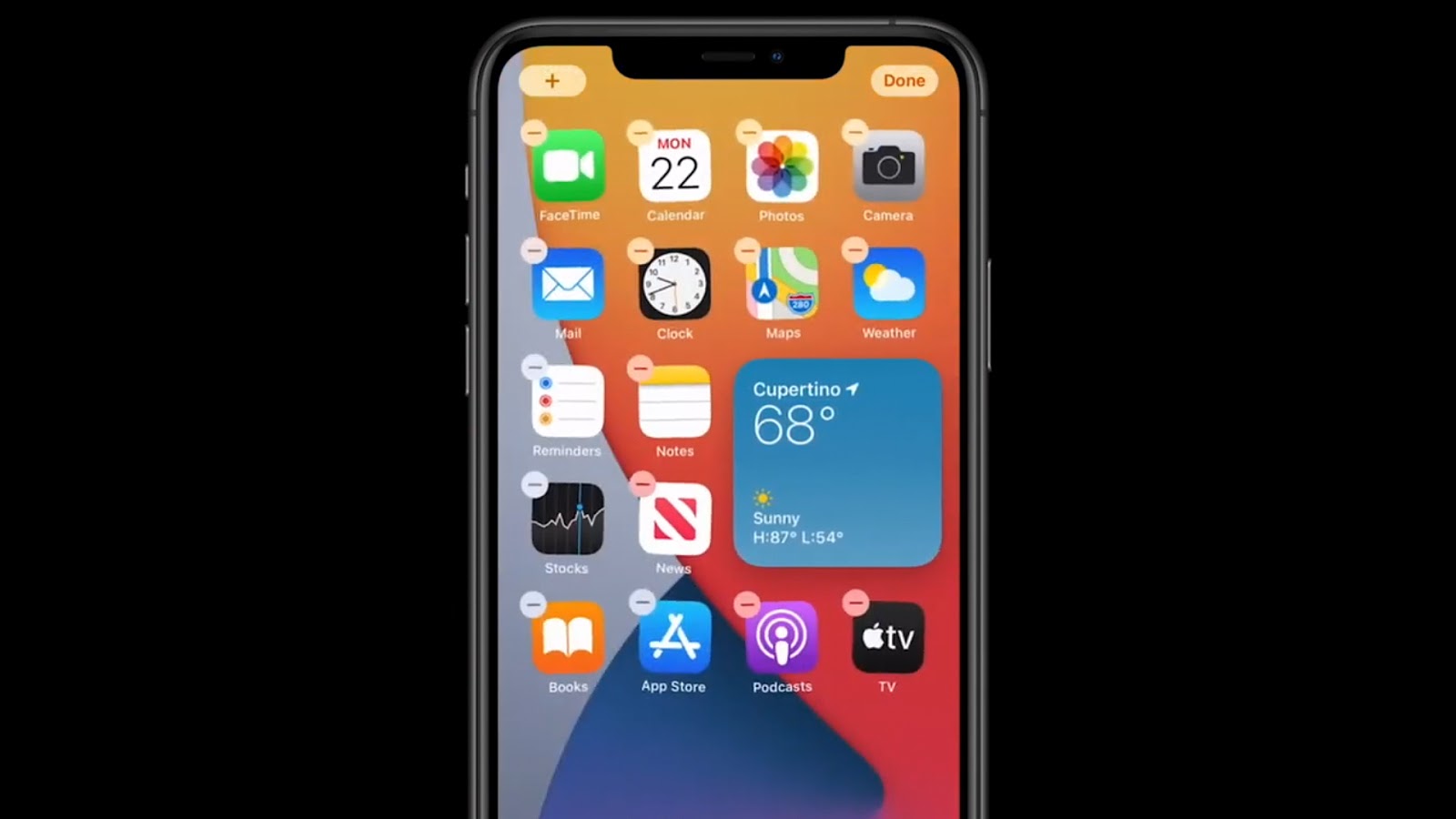

A number of the Apple-focused rumor sites, YouTubers, and bloggers have had concept photos of the next iteration of iOS showing widgets of various shapes and sizes on the Home Screen of an iPhone (among the typical grid of apps). 

(This is where Android users make snarky comments about this feature being available on their phones for years.) 

Apple Senior Vice President of Software Engineering Craig Federighi demonstrated this new ability during his iOS 14 presentation at WWDC. 

Users will be able add things like Weather and Calendar widgets to their Home Screen and place them to their liking among the app icons — and they can be sized to a user’s preference. 

The Home Screen has long needed to be more useful and customizable (much in the way a user can customize the complications on various Apple Watch faces). 

Quite honestly, I haven’t spent a lot of time swiping to look at the Today View on my iPhone, so I’ll be happy to have the ability to use widgets in a more useful way. 

Apple has also implemented something called a Smart Stack that allows users to scroll through several widgets on the Home Screen. You can either do this manually, or the Smart Stack can change the widget automatically based on the time of day you’re looking at your iPhone.  

APP CLIPS 


I’m a person who doesn’t like to have a lot of apps on my iPhone. 

I like to limit it to those I use the most. Part of this mindset came a decade ago when I had phones like the HTC Droid Eris and the iPhone 4s. Both devices had fairly small hard drives, so I tried to keep my phones “fit” as I went along.   

Obviously, smartphones today have infinitely more storage, faster processors, and bigger batteries. 

Be that as it may, my “daily driver” is an iPhone 6S Plus (a device that was released in 2015), so process-hungry apps are still a focus for me as it regards battery life on an older device. 

In my mind, one of the more irritating side effects of app development is when you are “out and about” somewhere and find out you need to download an app to be able to do something. 

An example of this might be a parking meter that requires an app to pay the fee (the University of Nebraska at Omaha has this setup in front of Milo Bail Student Center). 

When we’ve eaten at Qdoba over the past year or so, we’ve been told that we can only use the reward programs if we download their app. 

To be perfectly honest, I don’t really relish installing software when I’m away from home. I don’t want to do it on public wifi, and I don’t like doing it using our cellular service. 

Apple has come up with a solution to appease people like me with its new App Clips feature in iOS 14. 

Federighi described the functionality as the right app you need at just the right moment. 

An App Clip is a small part of an app. It’s light and fast and easy to discover. 

So, if you are at a parking meter that requires an app for payment, App Clip will open and allow you to pay using a portion of the app (without requiring users to download and install the entire app). 

There will be a number of ways users can access App Clips. Apple has also developed what it calls App Clip Code (something akin to a QR code) that they’d like entities to have on display so people can scan them with their iPhones. 

APPLE TV+ ADAPTATION OF ISAAC ASIMOV’S “FOUNDATION” SERIES


I’ve been an Apple TV+ subscriber for a few months now, and have started reviewing a number of the service’s original programming offerings on this blog. 

So far, I’ve been pretty impressed. 

At WWDC, Apple showed a sizzle reel and teaser trailer for its upcoming adaptation of science fiction scribe Isaac Asimov’s “Foundation” series (an epic drama encompassing various stories and novels). 

I’ll admit, I’m not at all familiar with Asimov’s “Foundation” series (but it sounds amazing). 

The Apple TV+ adaptation is helmed by David S. Goyer. Goyer served as a screenwriter on Christopher Nolan’s “The Dark Knight Trilogy.”  

In the teaser, Goyer mentions that the “Foundation” series influenced “Star Wars.” The early images of Apple’s new series certainly look epic in scope. I’m very excited to see if the narrative matches the visuals. 

I’m hoping it turns out to be a “must see” program on the Apple TV+ service. The series won’t debut until 2021. 

In the meantime, here is the trailer that debuted at WWDC: 


INTERFACE ENHANCEMENTS TO MACOS 


The upcoming iteration of Apple’s venerable Mac operating system is called macOS Big Sur (sticking with names of scenic wonders around California). 

With this release, Apple has ditched the 10.x numbering scheme for the first time since the NeXTSTEP-based operating system (built from technologies acquired from Steve Jobs in 1996) debuted in 2001. Instead of being called macOS 10.16, this version will be MacOS 11. 

With Big Sur, Apple continues the trend of making the desktop interface look more like iOS. 

Interface tweaks and enhancements don’t normally get my heart racing, but the overall look and feel presented in Big Sur signals increased integration between macOS, iOS, and iPadOS. 

There is more translucency in Finder windows and the Menu Bar at the top of the screen. 

Moreover, they’ve added a Control Center to macOS 11 that is basically a thematic counterpart to the Control Center on iOS and iPadOS devices. 


It is interesting to see the new app icons in Big Sur. Apple has adopted the “squares with rounded corners” look from iOS for the built-in apps in macOS 11.


My friend Jason Combs Tweeted during the keynote that it is becoming harder and harder to distinguish between Apple’s various operating systems. That is indeed true, and macOS 11 takes things several steps further toward a unified experience. 

One other note: While it isn’t an interface change, per se, Apple has brought back the “startup chime” in macOS Big Sur (it was removed from macOS in a 2016 update). You’ll be able to toggle it on and off in System Preferences. 

APPLE’S TRANSITION TO ARM PROCESSORS IN UPCOMING LAPTOPS AND DESKTOPS


Speaking of efforts to create a “unified experiences” among its various product lines… 

Reports have swirled for years about Apple shifting its laptop and desktop lineup away from Intel’s x86 processors in favor of its own silicon (based on the “A” series chips powering iPhones and iPads) using ARM (Advanced RISC Machine) architecture.


They are referring to these new processors as “Apple Silicon” (lets hope they have a better name in the future). 

Despite strong indicators Apple was headed in this direction, some prognosticators wondered if it would ever happen. 

The rumors have finally come true. It is happening. 

I’ve solely used Apple computers throughout my life (the brief exceptions being a couple courses in college that used DOS terminals and desktops running Windows 3.11). 

My first experience using a personal computer was in 1982 when I took a summer school course that taught Applesoft’s BASIC programming language on Apple II computers. 

I was a 9-year-old at the time (weird to think I learned to program lines of code at that age). 

Over the years, I grew to love the Apple II and the various models of Macintosh computers I used (both personally and in my business).  

When Apple announced a shift from PowerPC processors in 2005, they outlined an aggressive roadmap to move the entire Mac lineup to Intel processors (an effort that was complete by the end of 2006). 

That transition saw software developers make what were called “Universal” apps (that ran on both PowerPC and Intel-based Macs) and introduced an emulation environment called “Rosetta” (that would run PowerPC apps — that had not recompiled — on the new Intel Macs).

Both technologies were designed the ease the transition between platforms. 

Here we are — 15 years later — and Apple has announced a new transition that feels oddly similar to the one that took place in 2005. 

In the coming months, developers will be able to make “Universal 2” apps (that will run on existing Intel-based Macs and the upcoming "Apple Silicon” Macs). 


Apple will also include emulation software in mac OS 11 Big Sur called “Rosetta 2” (that will run Intel apps that haven’t been recompiled on the new "Apple Silicon” Macs). 


As I watched the WWDC presentation on this switch, it was fascinating to hear Apple using similar messaging to the talking points Steve Jobs used during the 2005 transition. 

I’m pretty excited to see what Apple is able to do with its desktop-class computers once they control the entire software/hardware experience. I have a feeling that the power-to-performance ratio will improve dramatically with Apple using its own silicon to power these machines. 

Because Apple has been so dependent on Intel’s roadmap the past 15 years, it has becoming increasingly difficult for the engineers in Cupertino to create innovative machines for its pro users. 

Intel’s struggles in recent years have been widely publicized. Making matters worse for Intel have been the advances AMD (Advanced Micro Devices) has made with its processor technology (some Mac users were hoping Apple would switch to AMD processors in its Mac lineup). 

I know transitions like this can scare users, but I really think it is a positive development for Apple. Having lived through the previous transition (and having used PowerPC and Intel computers in our business during that time), it wasn’t as problematic as people have made it out to be. 

As long as software developers retool their apps in the new version of Xcode (creating apps that use the Universal 2 binaries), users on both platforms should be fine. 

Native versions of Microsoft Office and Adobe Photoshop were shown running on a new ARM-based Macintosh computer. Apple also showed a resource-intensive, Intel-based videogame (that hasn’t been rebuilt for the new architecture) running surprisingly well in the Rosetta 2 emulation environment. 


Since many software companies have shifted to a SaaS model (software as a service), a lot of us have to “rent” productivity suites, like Adobe’s Creative Cloud suite of applications. The days of purchasing software with “perpetual” licenses is quickly becoming a thing of the past. 

As a result, the idea of shifting to a new platform is a lot less intimidating than it was in 2005. 

When you pay a monthly fee for your software, you’re not worried about having to fork over a couple thousand dollars for an upgrade when you purchase a new computer. The upgrades are included in the subscription fee. 

Big players like Adobe and Microsoft have already been building new versions of their core software assets (as Universal 2 apps) that will run on existing Intel-based systems and Apple’s new ARM-based Macs. 

Apple says the first of these news Macs will be available later this year, and that the transition will be complete in two years. I’m intrigued to see where things go from here. 

FINAL THOUGHTS 

In addition to the five items I highlighted, there is a whole lot more that is worth unpacking from this year’s WWDC keynote. 

My post scratches the surface of the enhancements and refinements Apple is gearing up to offer in upcoming software and hardware releases. 

One of the technologies previewed (that I didn’t highlight) is the new handwriting feature in iPadOS 14 called Scribble. 

Scribble allows users to do more with the Apple Pencil on iPad devices that support it. 

For example, you can sketch a basic shape (like a star) and the underlying programming can create a “cleaned up” version of your rough sketch. 


Scribble allows you to use the Apple Pencil to input text in form fields outside of apps that typically support handwriting and drawing. 

Safari is one such app. Apple Pencil users will be able to write terms in the search bar in Safari. The browser will then convert that to typed text and complete your search. 

Another nice feature is the ability to take blocks of handwritten text in a note, highlight them, and select “Copy as Text” so you can paste the block into another application (such as Microsoft Word). 

It will be interesting to hear how this feature works as people test the beta releases of iPadOS 14.

I know this post was more technical and “jargony” than the content I normally write on this blog. Since Apple is such an integral part of my marketing communications business — and my daily life — I wanted to share my thoughts on the news from Apple’s 2020 WWDC. 

It’ll be fun to see where things go from here!

To learn more about the technologies and projects featured in this blog post, visit www.apple.com


Sunday, May 31, 2020

Review: “Disney Gallery: ‘The Mandalorian’” (Making Of) - S1, E1 “Directing”


“I like hiring smart people. To me, if you have smart people who are curious and creative, but if they’re inspired and they’re sharp, they’ll be able to learn.” 
— Jon Favreau

When Disney+ debuted on Nov. 12, 2019, it brought us the first-ever live action “Star Wars” series in “The Mandalorian.” 

What it didn’t bring us was any “behind-the-scenes” or “making of” material diving into the show’s production. 

I love documentary content that unmasks how movies and TV shows are made. For example, the documentary “The Beginning” (that was part of the “Star Wars: Episode I - The Phantom Menace” DVD) continues to be one of my favorite “making of” documentaries. I love to see everything that goes into making a movie. 

Thankfully, the Mouse has an all-new series called “Disney Gallery” that gives fans a look behind the curtain of the first season of “The Mandalorian.” 

The series will be eight episodes in total (each has a running time of about 30 minutes). 

The first episode is titled “Directing.” It features a roundtable discussion with production footage interspersed.


First of all, I find each of the season’s directors — Dave Filoni, Bryce Dallas Howard, Taika Waititi, Deborah Chow, and Rick Famuyiwa — to be fascinating.

I really enjoyed hearing from Dave Filoni (an animator who has helmed shows like “The Clone Wars,” “Star Wars Rebels,” and “Star Wars Resistance”). Filoni (in his signature black cowboy hat) offers some terrific anecdotes about how he was hired by George Lucas for “The Clone Wars” gig.


“My job was to show this guy as he is, as he has been,” Filoni said of the “The Mandalorian’s” first episode. 

I’ve watched “Star Wars Rebels” (read my review) and I’m working my way through “The Clone Wars” as I write this. The fact is that both series are brilliant and embody what “Star Wars” is all about. 

Jon Favreau (The executive producer and creator of “The Mandalorian”) said that Filoni has “a strong intuition about what George would say.” 


In my mind, that intuition is what made the first season of “The Mandalorian” so strong — and (in many ways) superior to the recent “sequel trilogy” we saw released theatrically. 

My hope is that these directors can serve as a “proving ground” for future productions — beyond “The Mandalorian.” 

It appears this is already happening. 

It was announced this month that Academy Award winner Taika Waititi (who directed “Chapter 8: The Redemption”) will direct and co-write an upcoming “Star Wars” live action film. 

We learned last year that Deborah Chow (who directed “Chapter 3: The Sin” and “Chapter 7: The Reckoning”) is set to handle all directing duties for the upcoming Disney+ series centered on Obi-Wan Kenobi. 

While none of the information in the first episode is particularly revelatory, there are some nice moments as we hear from these directors. 

“There’s a real responsibility working with these kinds of characters and these kinds of stories,” said Bryce Dallas Howard (who directed “Chapter 4: The Sanctuary”). 


Howard recounts a time in her youth when she was on a trip to Japan with her father (actor/director Ron Howard) where they (along with George Lucas) had a meeting with legendary filmmaker Akira Kurosawa. 

I have a feeling that Howard — along with the rest of the directors — are going to have a significant influence on the future of the “Star Wars” universe. 

I’m looking forward to watching the rest of the first season of “Disney Gallery: ‘The Mandalorian’” — stay tuned for the my reviews of the rest of this episodes in the behind-the-scenes series. 


Book Review: “Elon Musk: Tesla, SpaceX, and the Quest for a Fantastic Future” By Ashlee Vance


I’ve mentioned in some other posts on this blog that I like to read non-fiction books when I travel. Because there are so many distractions when you are on the road, it is nice to find something that you can just pick up and read in chunks here and there. 

It took me a year — and two airplane trips — but I’ve finally finished “Elon Musk: Tesla, SpaceX, and the Quest for a Fantastic Future” by Ashlee Vance. 

(Don’t let the author’s first name fool you... Ashlee Vance is a male.) 

Vance — an experienced tech reporter and author — takes a deep dive into the life of one of Silicon Valley’s most ambitious (and, at times, controversial) technology entrepreneurs. 

I pushed myself to finish the book in conjunction with the first manned SpaceX mission to space. The landmark Demo-2 mission saw SpaceX’s Falcon 9 rocket carrying the Crew Dragon capsule to the International Space Station on May 30, 2020. 


It was the first manned mission from U.S. soil since 2011. The joint SpaceX/NASA mission also has the distinction of being the first manned orbital launch led by a commercial company (all part of Musk’s effort to become an “interplanetary species” in the future). 


Vance’s biography (published in 2015) is set up in a “cradle to grave” structure, starting with Musk’s early life growing up in South Africa and following him through the tech ventures he is currently behind. 

Readers are treated to youthful anecdotes and accomplishments such as computer game he designed at age 12 called Blastar. We also learn about an episode in school when he was bullied by a group of boys Musk refers to as “a bunch of f*cking psychos.” (Elon had a nose job in 2013 to fix the lingering damage caused by one particular beating.)

Elon Musk has quickly become my favorite entrepreneur. His persona has often been compared to eccentric business mogul Howard Hughes and fictional superhero Tony Stark — the latter a comparison he obviously favors. 

“Near the elevators [of the SpaceX headquarters],” writes Vance, “Musk has placed a glowing, life size Iron Man figure.” 

My interest in Musk stems from the innovative technologies he has been behind during his professional career. To say he is prolific is an understatement. 

Musk is the founder, CEO, and chief engineer/designer at SpaceX, CEO and product architect at Tesla, founder of The Boring Company, co-founder of Neuralink, and co-founder and initial co-chairman of OpenAI. 

(Tesla owns solar company SolarCity as a wholly-owned subsidiary). 

Musk was also one of the “techpreneurs” behind PayPal in the early 2000s. 

As is the case with many motivated entrepreneurs throughout the 20th and 21st century, Musk has been described as being difficult to work with. 

“Numerous people interviewed for this book decried the work hours, Musk’s blunt style, and his sometimes ludicrous expectations,” writes Vance. “Yet almost every person — even those who had been fired — still worshipped Musk and talked about him in terms usually reserved for superheroes and deities.” 

While the book’s large, biographical strokes are interesting, it is the little oddities that make “Elon Musk: Tesla, SpaceX, and the Quest for a Fantastic Future” fascinating. 

For example, Vance writes about one of Musk’s “famous e-mails” (from 2010) titled “Acronyms Seriously Suck” where he expressed his disdain for the practice: 

“… a few acronyms here and there may not seem so bad, but if a thousand people are making these up, over time the result will be a huge glossary that we have to issue to new employees. No one can actually remember all these acryonyms and people don’t want to seem dumb in a meeting, so they just sit there in ignorance. This is particularly tough on new employees …” 

One of my favorite Musk ventures is electric car company Tesla. The beautiful automobiles are inspiring and provide a glimpse into what most cars will be like in the future. 

“Like Steve Jobs before him,” writes Vance, “Musk is able to think up things that consumers did not even know they wanted — the door handles, the giant touch-screen — and to envision a shared point of view for all of Tesla’s products and services.” 

The latest Tesla — the Model Y — was released on March 15, 2009. Tesla refers to the car as a mid-size SUV, and it is the natural offspring of the Model X (a luxury SUV) and the Model 3 (the company’s affordable sedan).

Bridget and I had the chance to visit a Tesla Store for the first time when we attended the INBOUND conference in Boston, MA, in 2019. I enjoyed having the opportunity to sit in each of the vehicles on display.


Reading “Elon Musk: Tesla, SpaceX, and the Quest for a Fantastic Future” has given me a greater appreciation for the thought process that goes into the work that Musk’s companies undertake each year. 

All of the little details gleaned in Vance’s novel bubbled to the surface as I watched SpaceX’s launch on May 30th. 

One of those details regarded a welding technique mastered by SpaceX during the company’s formative years.

“From the early days of SpaceX,” Vance writes, “Musk pushed the company to master friction stir welding, in which a spinning head is smashed at high speeds into the joint between two piece of metal in a bid to make their crystalline structures merge. It’s as if you heated two sheets of aluminum foil and then joined them by putting your thumb down on the seam and twisting the metal together. This type of welding tends to result in much stronger bonds than traditional welds.”

All of these moments — taken in total — paint a picture of a man who is willing to employ new techniques and inventive technologies to create more efficient processes, equipment, and products. 

A company like SpaceX has come a long way since the days when Musk traveled to Moscow to try and purchase a refurbished intercontinental ballistic missile from some shady Russians to use as a launch vehicle (the effort failed and Musk eventually decided to build the rocket himself). 

As I sit here typing this, it is mere hours after SpaceX’s Dragon capsule carrying two astronauts successfully docked with the International Space Station. 

That achievement proves once again that entrepreneurial curiosity and tenacity eventually pays off. Our world needs more businesspeople with a mindset like Elon Musk. 


If you are interested in business profiles, “Elon Musk: Tesla, SpaceX, and the Quest for a Fantastic Future” is a worthwhile read. What makes the narrative so compelling is that the author isn’t afraid to get his hands dirty as he delves into the life and work of one of today’s most fascinating minds in technology. 

“I remain as convinced as ever that Musk will succeed in his quests,” writes Vance. “He’s not really wired to fail.” 


Saturday, May 30, 2020

TV Review: The “Mythic Quest” Quarantine Episode is Brilliant (Apple TV+ Special)


“Hey Poppy! I waited for you... I waited for you this time in the meeting.” — Ian Grimm in the “Mythic Quest” Quarantine Special

The past two months, we’ve watched Hollywood employ a number of interesting gimmicks to film new content as actors and crews have been stuck at home. 

Recent examples of quarantine-centered specials include a “Parks and Recreation” reunion (with the original cast reprising their roles) and an episode of the CBS legal drama “All Rise.” 

Apple’s workplace comedy “Mythic Quest: Raven’s Banquet” joined the fray of properties creating an original episode designed to look like it was filmed using videoconferencing software. 

According to an article on Vulture, the cast used 40 iPhones and 20 sets of AirPods to film the episode (along with the use of prosumer-grade software on those devices). The actors would connect via Zoom on their computers, but film their content using the cameras on the iPhones.


The overall effect was good. Creator and star Rob McElhenney (along with the other players) crafted a fun episode that had solid production value and a fun vibe. 

You’re limited with what you can do on a videoconference-centered episode. That said, I thought thought McElhenny & Co. did a decent job avoiding some of the “remote work” cliches that have become prevalent in humorous content the past few months. It was fun to watch the fictitious video game company manage their multi-player role playing game remotely. 

More than anything, it was nice to catch up with the endearing cast of characters — Poppy Li (Charlotte Nicdao), David Brittlesbee (David Hornby), Brad Bakshi (Danny Pudi), C.W. Longbottom (F. Murray Abraham), Sue (Caitlin McGee), Rachel (Ashly Burch), Dana (Imani Hakim), and Jo (Jessie Ennis). 

I won’t give anything away, but the quarantine episode’s last four minutes are brilliant and serve as a reminder why I applauded the genius of “Mythic Quest’s” first season in my March review

I still believe that “Mythic Quest: Raven’s Banquet” is the best thing on the AppleTV+ streaming service and I can’t wait until the cast and crew are back together to film more episodes!

If you’d like to learn more about the series — and watch the first two episodes for free — visit the Apple TV website or via the Apple TV app. 


Thursday, May 28, 2020

TV Review: Is Amazon’s Sci-Fi Comedy Series “Upload” Worth Watching?


I’m going to say upfront that the Amazon Prime Video service is one that I’ve never really “loved.” 

Sure, there are a couple of the service’s original series — “Bosch” and “Jack Ryan” — that I’ve really enjoyed the past few years. 

But a lot of the original content failed to grab me. 

I’m sure that’s an unfair sentiment on my part. I’d imagine many of you have worthwhile recommendations you could make. 

Bridget and I decided to try the new sci-fi comedy series “Upload” based on a number of commercials we’d seen for the show on network television. 

“Upload” was created by Greg Daniels, the mind behind the U.S. version of “The Office,” “Parks and Recreation,” and “King of the Hill.” He is also the creator of the Netflix series “Space Force.”

“Upload” takes place on Earth in the near future (2033 to be exact) and tells the story of a world where people have the ability to upload a digital version of themselves into a digital afterlife of their choice. 

Some people are better able to afford a comfortable afterlife than others (similar in concept to varying funeral ceremony and burial arrangements of the present). 


The show’s protagonist is Nathan Brown (Robbie Amell, who I’d describe as a “low rent Tom Cruise”), a 27-year-old computer programmer who sustains fatal injuries in a freak car accident and ends up in Lake View, a ritzy resort world that is considered one of the best afterlife options. 

His girlfriend Ingrid Kannerman (Allegra Edwards), a wealthy socialite, foots the bill for Nathan’s stay, hoping they’ll be able to eventually spend all eternity together in Lake View.  


Much of the first season of “Upload” is dedicated to Nathan adjusting to “digital heaven.” 

The immersive afterlife is something akin to the world featured in the Kristen Bell comedy “The Good Place.” In fact, the whole vibe of “Upload” is similar in nature (except it leans more toward the sci-fi end of the spectrum and is less fantastical). 

Nathan initially feels listless in his new environment, but soon forges a special bond with his afterlife handler (referred to as an “angel”) Nora Antony (Andy Allo) — an employee at Horizen, the New York City company that owns Lake View. (I get the sense that Horizen is modeled on Verizon, what with the references to data caps vs. unlimited data.)


Throughout “Upload’s” 10-episode first season (each episode runs about 30 minutes) the narrative veers between Nathan’s existence in a computer and the real world exploits of the people he interacts with. 

While the show is far from perfect — and appeals to a very specific taste — it is pretty entertaining. 

The cast is also likable. I wasn’t sure initially whether Robbie Amell could capably carry the show as the main protagonist, but I grew to like his character as the season wore on. Nathan’s arc in the story is somewhat predictable, but enjoyable nonetheless. 


I thought Andy Allo did a nice job as the “angel” Nora. Her performance struck the right balance, and you could feel her inner conflict as she dealt the moral dilemma of what exactly defines a relationship in 2033. 


I should also note that a subplot is introduced early on about a business venture Nathan was involved in with his friend Jamie (Jordan Johnson-Hinds) that would provide afterlife services free of charge to the populace. 

Something I didn’t think was necessary was some of the more gratuitous “grown up” content in the season (the show is rated TV-MA). While various cable and streaming outlets give creators more “freedom” with content, sometimes the resultant effect can “cheapen” a show. 

I think of all the iconic episodes of “Seinfeld” that successfully navigated the network standards and practices personnel. If “Seinfeld” had been on an outlet like HBO, an episode like “The Contest” might not have been as compelling. 

It’s a minor quibble, but I think the show (which has been renewed for a second season) would benefit from some judicious trimming. 

Overall, I enjoyed the first season of “Upload.” While it would benefit from some tweaks next season, it is a program worth installing into your viewing lineup.