“If you want me out, you’re gonna have to cut me yourself, sir.” — Tracy Stevens in “For All Mankind”
It’s kind of nice when a TV series surprises you.
When I say “surprise,” I’m not necessarily referring to a bunch of twists, turns, and shocking cliffhangers you don’t see coming — although, the series I’m talking about has plenty of narrative loops to keep you intrigued throughout.
The Apple TV+ series “For All Mankind” looks at the early days of the “space race” through an alternate history lens.
Instead of Neil Armstrong being the first man to step foot on the moon in 1969, “For All Mankind” imagines a world where Soviet cosmonaut Alexei Leonov is the first man on the celestial body.
That wrinkle sets into motion a series of events that forever changes the global space race between the United States and the U.S.S.R.
More to the point, the space race becomes the arena where the Cold War is fought, and NASA’s de facto role finds the agency developing technologies in a tit-for-tat tussle with the Russians for interstellar supremacy.
Going into “For All Mankind,” I was expecting a schmaltzy bit of revisionist history — a story that leaned on nostalgia for the early days of space exploration as its hook. I wasn’t expecting a lot of depth.
I was wrong.
My initial perception was incorrect and the narrative structure is so much more than the promos led me to believe.
Much in the way a period drama like “Mad Men” used "midcentury advertising” to explore the socio-political issues impacting the country in the 1960s and 1970s, “For All Mankind” employs a similar technique as it explores the lives of the men and women working in the space program.
Sure, things can get a bit melodramatic at times. That said, watching the lives of the people behind the NASA program in the series (told from personal and professional perspectives) makes for a pretty compelling drama.
“For All Mankind” was the brainchild of Ronald D. Moore.
Moore is a screenwriter and producer whose talents have been on display in TV series like 1990s-era “Star Trek” and the wildly popular 2000-era reboot of “Battlestar Galactica.”
While the visuals and set design are immersive in “For All Mankind,” it is the human drama that kept Bridget and me tuning in. We see fictional characters intermingling with historical figures in a way that brings a sense of verisimilitude to the episodes.
I found a number of the characters to be interesting.
In particular, the two couples at the core of the show’s main plotline anchor the drama.
Astronaut Ed Baldwin (Joe Kinnaman) and wife Karen (Shantel VanSanten) epitomize the straight-arrow, WASP-y families found in postwar suburbs across the U.S. in the 1960s.
Acting as a counterpoint to the Baldwin clan is Astronaut Gordo Stevens (Michael Dorman) and wife Tracy (Sarah Jones). Gordo’s philandering ways harm his marriage, and his restless wife is yearning for a path beyond that of a stay-at-home mom.
As we watch the interplay between these couples and their families, we see characters who are allowed to change and evolve as the first season’s 10-episode arc progresses.
At the beginning of the first episode, the couples seemed like they were in place to serve an archetype of the period. But as things moved along, it was nice to see each of those four characters “breathe” (narratively speaking). They became multi-dimensional as a result.
While both of those couples anchor the show, it is the supporting cast that gives “For All Mankind” its flavor. There are a number of good performances during the first season.
In particular, I thought Lenny Jacobson’s performance as Wayne Cobb (an affable counter-culture artist in the series) was particularly good. I don’t want to talk too much about the performance (because I don’t want to reveal any spoilers), but smaller roles like his made the first season interesting.
I also enjoyed Wrenn Schmidt as NASA engineer Margo Madison. Her character is quietly intense as she navigates politics and social norms of the time as the first woman in Mission Control. When the series begins, we learn that she has been mentored by Wernher Von Braun (Colm Feore). As the series progresses, she pays that tutelage forward when she takes Aleida Rosales (Olivia Trujillo) — the daughter of a NASA custodian — under her wing.
“For All Mankind” has certain elements that will remind viewers of movies like “Apollo 13” and “The Right Stuff,” as well as TV shows like 1984’s “Call To Glory.”
The show’s main title is composed by Jeff Russo. Russo has had a fairly prolific career (primarily composing TV theme songs). His credits include opening themes for properties in the “Star Trek” franchise (he most recently composed the theme for “Star Trek: Picard”).
The title track he composed for “For All Mankind” sounds like it could be a “Star Trek” score (it is both epic and inspiring):
The show’s soundtrack also features recognizable pop songs from the 1960s and 70s. The first season of “For All Mankind” spans the period of time between 1969 and 1974.
As I mentioned earlier, the show strives for an authentic look and feel. This featurette dives into the production design for the first season. Set designers had access to actual tools used by NASA during the era, and the show’s costume designer thumbed through old Sears Catalogs for inspiration:
Overall, I thought “For All Mankind” was an engrossing drama. I went in with lukewarm expectations and was surprised how much I enjoyed it.
I’ve praised other offerings on Apple’s budding streaming service, but this is one of the best in the lineup. There is a lot to like in the first season.
By the way, be sure to watch through the end credits of the final episode (Episode 10 “A City Upon a Hill”) for a post-credit “Easter egg.”
“Repetition will bring hell down from on high…” — Capt. Ernest Krause in “Greyhound”
The new Tom Hanks World War II naval adventure “Greyhound” tries valiantly to achieve the sort of reverential status that modern war movies like “Dunkirk” and “1917” have enjoyed in the modern movie lexicon.
“Greyhound” was originally slated for a theatrical release in 2020, but the global COVID-19 pandemic (and the resulting closure of movie theaters) left the film’s release date in limbo. As a result, Sony sold the rights to Apple (for a reported $70 million), and the movie debuted July 10 on the Apple TV+ subscription streaming service.
When I first saw the trailer for “Greyhound,” I thought it looked like it could be an entertaining film. I tend to enjoy movies centered around World War II. I have also read a number of Navy-centric fiction novels over the years, written by authors who served on ships and submarines.
“Greyhound” tries really hard to capture the spartan vibe that Christopher Nolan’s “Dunkirk” (read my review) imbued when it was released in 2017 — albeit on a much smaller budget.
For those of you who have seen “Dunkirk,” you’ll recall that the film had a scant amount of exposition and character development. Instead, Nolan’s story worked diligently to “show” rather than “tell.” It was a movie where a facial expression meant just as much as a piece of dialogue.
The downside of “Dunkirk” was the fact that you didn’t really connect with any of the characters on screen. That flaw was forgivable in large part due to “Dunkirk’s” authentic look and feel — that film stands as a technical masterpiece.
“Greyhound” tries to follow a similar path as it tells the story of Capt. Ernest Krause (Hanks) as he commands the USS Keeling — codenamed GREYHOUND — and a convoy of 37 troop and supply ships and four light warships traveling to Liverpool, England.
The movie is based on the 1955 novel “The Good Shepherd” by C.S. Forester (who also wrote the Horatio Hornblower novels). The screenplay was penned by Hanks. Aaron Schneider handled the directing duties.
The narrative tension in “Greyhound” involves the supply convoy navigating what was known as the “Black Pit” (due to a lack of cover from aircraft) during the Battle of the Atlantic in 1942.
The action remains firmly onboard the Greyhound as we watch the crew play a cat-and-mouse game with German U-Boats.
The mission is Krause’s first in command of a vessel. I must admit that it seemed a tad bit odd having a 64-year-old actor playing a character in that situation.
The fact that it was his first command wasn’t really explained. It was mentioned during a brief flashback scene where we see Krause exchanging Christmas gifts with an apparent love interest named Evelyn (Elisabeth Shue).
In some respects, the world-weary performance by Tom Hanks is almost “too steady” in the film’s narrative structure. You never felt like he would unravel (as might have happened with a younger actor in the role), or that the crew was in danger under his watch.
We all know that Hanks is the modern-day equivalent of Jimmy Stewart. This seems like a role that could have been tailor-made for Stewart back in the day.
Ernie Krause is a man of faith. We see him praying aboard the Greyhound, and he has a card affixed to his mirror that reads “Jesus Christ The Same Yesterday, Today, and Forever. — Hebrews 13:8.”
“Greyhound” manages to keep the action moving. There aren’t any lulls in the story.
For fans of the military genre, there is plenty of jargon-filled dialogue strewn throughout the movie. There’s something satisfying about a war movie where the technology is analog in nature.
As you can imagine, the amount of CG in “Greyhound” is considerable (as is the case with many modern movies of this ilk). The visual effects are decent, for the most part.
One of the things that made “Dunkirk” special was the fact that Nolan emphasized practical effects (the scenes of Supermarine Spitfires buzzing through the air were terrific). It’s as if that story was written in a way that would allow as many practical sets and effects as possible.
“Greyhound” doesn’t lend itself to that structure, and some of the external shots (away from the USS Keeling) leave a bit to be desired.
(I’m admittedly a “graphics snob” who has a hard time “willfully suspending my disbelief” with some of today’s effects-heavy productions. Sometimes things just don’t look as real as I’d like...)
The theatrical score is composed by Blake Neely (who has primarily composed TV scores) and it is pretty solid. It definitely captures the mood and vibe of the material presented:
Overall, “Greyhound” is a competently made film. Tom Hanks is good in the movie, and military aficionados should enjoy the production. There’s also something inherently “old fashioned” about the production, and I think that’ll appeal to a segment of fans.
I just felt like the movie was missing “something.” Despite our heroes being bombarded with dangerous scenarios (with a few tragic moments strewn about), I never felt the sense of “tension” a movie fan feels when a war movie is truly gripping.
This won’t be the last World War II drama Tom Hanks makes for Apple TV+. Hanks and Steven Spielberg are producing an eight-episode miniseries for the streaming service called “Masters of the Air” (which will focus on the 100th Bombardment Group of the Eighth Air Force).
In the meantime, if you’d like to view “Greyhound” for yourself, you can do so on the Apple TV website or via the Apple TV app.
When Apple TV+ was first announced in 2019, the dystopian sci-fi series “See” looked like one of the more intriguing entries among those available when the service debuted.
I’ve had Apple TV+ for the past few months and finally made my way through the Jason Momoa-led show.
“See” takes place on Earth in the far future when the human race has lost its ability to see (hence the name of the series).
The outbreak of a deadly virus in the 21st century reduced the human population on the planet to less than 2 million people. The survivors all emerged blind.
As a result of the mass blindness, a society emerged that has adapted to a world without vision (over the course of centuries).
Some of the methods used for communicating in a sightless existence are fairly clever. For example, tied knots on pieces of rope serve as a substitute for the written word.
The world presented is tribal in nature, and the first season of “See” feels more akin to a 19th century wilderness story than a futuristic tale.
Momoa plays Baba Voss, the chief of the Alkenny tribe. He is married to Maghra (Hera Hilmar), a pregnant woman who came to Alkenny village seeking help.
Maghra’s twin children (a boy and a girl) are born able to see — something considered to be a witch-like ability.
The twins’ forbidden gift — and the danger the ability brings — sets into motion the macro narrative that carries “See” through its first season.
The twins attract the attention of Queen Kane (Sylvia Hoeks), the peculiar leader of the Payan Kingdom. She dispatches General Tamacti Jun (Christian Carmago) to hunt the heretics down (a hunt that, at times, reminded me a bit of plot points featured in the George Lucas fantasy film “Willow”).
The twins are named Kofun (Archie Madekwe) and Haniwa (Nesta Cooper). We soon learn they are the children of a mysterious man named Jerlamarel (Joshua Henry).
“See” is the creation of screenwriter Steven Knight. Knight is probably best known for the Netflix series “Peaky Blinders” (which he created and serves as a writer and executive producer). I’ve never watched that show, but have noticed it was available on Netflix.
Knight also wrote the screenplay for the 2016 World War II thriller “Allied” (read my review).
I went into “See” not really knowing what to expect.
As I watched the first season, my opinion bounced around like the readout on a PKE meter. Some moments were quite compelling. Other moments left me somewhat underwhelmed.
Overall, I found the first season of “See” to be something of a mixed bag.
The strong points in “See” rest largely on the shoulders of Jason Momoa.
If you’re looking to cast a brawny leader of a futuristic tribe, the “Aquaman” star seems tailor-made for the part. With his scraggly locks, bushy beard, and tattoos, Momoa brings instant authenticity to the role of Baba Voss.
You genuinely believe he is a blind man who has developed a keen sense of hearing — and a warrior’s intuition for unseen dangers lurking at every turn — in this environment.
Momoa definitely brings an enthusiasm to the material, and his performance is the best thing about the first season. You can tell he is having a good time in the role.
He recently posted some fun behind-the-scenes material from “See” on his YouTube channel:
A number of the other cast members do a yeoman’s job in their roles, creating characters that show promise for the future.
Alfre Woodard brings quite a bit of energy to the character of Paris, a spiritual elder in the Alkenny tribe (a welcome trait in a show that can plod along at times). The character is tasked with a number of responsibilities in the season’s story structure — and the exposition she doles out helps viewers make sense of this mysterious world.
Even though I found the Queen Kane character to be overly bizarre, Sylvia Hoeks did create a memorable character. She created a character that was cunning, paranoid, and downright weird.
I also thought that Nesta Cooper did a solid job as Haniwa (one of the sighted twins). Cooper portrays the character during her teenage years, and brings a tough feistiness to the role. It is a nice counterpoint to Archie Madekwe’s performance as her brother Kofun.
The frustrating thing about a show like this is that a considerable amount of time is spent doing “world building” during the early episodes. While that task is necessary to establish the rules of the unique world in “See,” the added exposition can cause the storyline to drag.
That’s why a lot science fiction and fantasy movies and TV series rely on familiar tropes when telling stories.
Be that as it may, you have to admire the filmmakers for trying to do something different with “See.”
“See’s” production is the real highlight of the first season. The show is filmed in some gorgeous locales around Vancouver, British Columbia.
Lush forests and breathtaking mountain landscapes envelope much of the first season’s story. The 4K UHD video presented on Apple TV+ is really lovely.
One of the technical aspects I didn’t care for was the show’s musical score — or lack thereof. The music (what there is of it) is composed by Bear McCreary.
While McCreary’s score tries to convey a sense of foreboding and tension, it didn’t quite resonate with me. Parts of it reminded me of Hans Zimmer’s score for the movie “Dunkirk” (read my review) — where the score is less about the “music” and is employed to emphasize the sound effects on screen (if you get my drift).
Despite some promising elements, the overall tone of the show is so “dreary” that it can be hard to stick with. It took me a few months to work my way through the eight-episode season (each episode runs about an hour).
I think there are some interesting possibilities for future seasons. To that end, the season finale set things up for what could become a fascinating story as things move forward.
(The eighth episode also features one of Momoa’s best “one liners” of the season — it happens during a fight sequence at the end of the episode. This is a “no spoilers” review, so you’ll just have to watch for yourself to see what he says!)
I just can’t tell at this point whether or not I really like “See.”
The show is like a bizarre mix of “Mad Max,” “Waterworld,” and “The Hunger Games.”
It’s very possible that “See” will be a series that is more of a “slow burn” — requiring multiple seasons to develop a truly compelling narrative.
We’ll see… If you’d like to learn more about the series — and watch the first two episodes for free — visit the Apple TV website or watch via the Apple TV app.
I’ve written several posts on this blog about Apple, my love of the company’s products, and the new streaming service Apple TV+.
For me, each new announcement and presentation is something akin to Christmas Day.
Because of COVID-19 global pandemic, Apple changed its annual World Wide Developers to a “virtual” gathering online — making the conference free this year.
Because the company’s keynote is a stage-based production, I wasn’t sure how this year’s event would feel.
As many pundits Tweeted during the keynote (including myself), the production value on the event was pretty slick, and very informative.
Sadly, there weren’t any hardware reveals or teases this year (I was excited to see a redesigned iMac), but there were a number of details on upcoming software updates for iOS 14, iPadOS 14, TVOS 14, and macOS Big Sur. Along with the enhancements to the core software, Apple outlined its desktop/laptop transition from Intel’s x86 processors to their own custom processors, dubbed “Apple Silicon.”
Here are my five favorite highlights from the event:
WIDGETS ON THE HOME SCREEN IN IOS
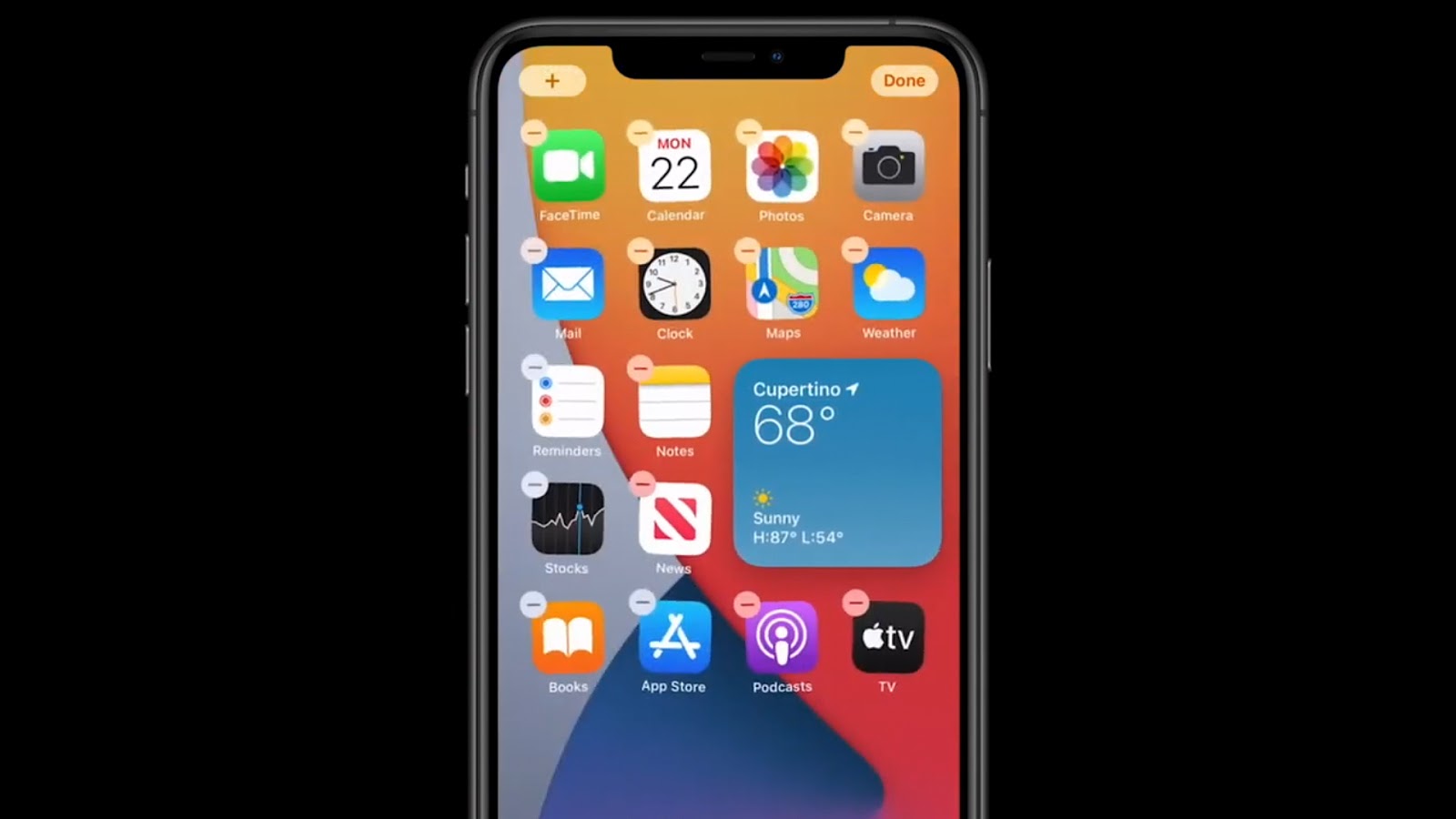
A number of the Apple-focused rumor sites, YouTubers, and bloggers have had concept photos of the next iteration of iOS showing widgets of various shapes and sizes on the Home Screen of an iPhone (among the typical grid of apps).
(This is where Android users make snarky comments about this feature being available on their phones for years.)
Apple Senior Vice President of Software Engineering Craig Federighi demonstrated this new ability during his iOS 14 presentation at WWDC.
Users will be able add things like Weather and Calendar widgets to their Home Screen and place them to their liking among the app icons — and they can be sized to a user’s preference.
The Home Screen has long needed to be more useful and customizable (much in the way a user can customize the complications on various Apple Watch faces).
Quite honestly, I haven’t spent a lot of time swiping to look at the Today View on my iPhone, so I’ll be happy to have the ability to use widgets in a more useful way.
Apple has also implemented something called a Smart Stack that allows users to scroll through several widgets on the Home Screen. You can either do this manually, or the Smart Stack can change the widget automatically based on the time of day you’re looking at your iPhone.
APP CLIPS
I’m a person who doesn’t like to have a lot of apps on my iPhone.
I like to limit it to those I use the most. Part of this mindset came a decade ago when I had phones like the HTC Droid Eris and the iPhone 4s. Both devices had fairly small hard drives, so I tried to keep my phones “fit” as I went along.
Obviously, smartphones today have infinitely more storage, faster processors, and bigger batteries.
Be that as it may, my “daily driver” is an iPhone 6S Plus (a device that was released in 2015), so process-hungry apps are still a focus for me as it regards battery life on an older device.
In my mind, one of the more irritating side effects of app development is when you are “out and about” somewhere and find out you need to download an app to be able to do something.
An example of this might be a parking meter that requires an app to pay the fee (the University of Nebraska at Omaha has this setup in front of Milo Bail Student Center).
When we’ve eaten at Qdoba over the past year or so, we’ve been told that we can only use the reward programs if we download their app.
To be perfectly honest, I don’t really relish installing software when I’m away from home. I don’t want to do it on public wifi, and I don’t like doing it using our cellular service.
Apple has come up with a solution to appease people like me with its new App Clips feature in iOS 14.
Federighi described the functionality as the right app you need at just the right moment.
An App Clip is a small part of an app. It’s light and fast and easy to discover.
So, if you are at a parking meter that requires an app for payment, App Clip will open and allow you to pay using a portion of the app (without requiring users to download and install the entire app).
There will be a number of ways users can access App Clips. Apple has also developed what it calls App Clip Code (something akin to a QR code) that they’d like entities to have on display so people can scan them with their iPhones.
APPLE TV+ ADAPTATION OF ISAAC ASIMOV’S “FOUNDATION” SERIES
I’ve been an Apple TV+ subscriber for a few months now, and have started reviewing a number of the service’s original programming offerings on this blog.
So far, I’ve been pretty impressed.
At WWDC, Apple showed a sizzle reel and teaser trailer for its upcoming adaptation of science fiction scribe Isaac Asimov’s “Foundation” series (an epic drama encompassing various stories and novels).
I’ll admit, I’m not at all familiar with Asimov’s “Foundation” series (but it sounds amazing).
The Apple TV+ adaptation is helmed by David S. Goyer. Goyer served as a screenwriter on Christopher Nolan’s “The Dark Knight Trilogy.”
In the teaser, Goyer mentions that the “Foundation” series influenced “Star Wars.” The early images of Apple’s new series certainly look epic in scope. I’m very excited to see if the narrative matches the visuals.
I’m hoping it turns out to be a “must see” program on the Apple TV+ service. The series won’t debut until 2021. In the meantime, here is the trailer that debuted at WWDC:
INTERFACE ENHANCEMENTS TO MACOS
The upcoming iteration of Apple’s venerable Mac operating system is called macOS Big Sur (sticking with names of scenic wonders around California).
With this release, Apple has ditched the 10.x numbering scheme for the first time since the NeXTSTEP-based operating system (built from technologies acquired from Steve Jobs in 1996) debuted in 2001. Instead of being called macOS 10.16, this version will be MacOS 11.
With Big Sur, Apple continues the trend of making the desktop interface look more like iOS.
Interface tweaks and enhancements don’t normally get my heart racing, but the overall look and feel presented in Big Sur signals increased integration between macOS, iOS, and iPadOS.
There is more translucency in Finder windows and the Menu Bar at the top of the screen.
Moreover, they’ve added a Control Center to macOS 11 that is basically a thematic counterpart to the Control Center on iOS and iPadOS devices.
It is interesting to see the new app icons in Big Sur. Apple has adopted the “squares with rounded corners” look from iOS for the built-in apps in macOS 11.
My friend Jason Combs Tweeted during the keynote that it is becoming harder and harder to distinguish between Apple’s various operating systems. That is indeed true, and macOS 11 takes things several steps further toward a unified experience. One other note: While it isn’t an interface change, per se, Apple has brought back the “startup chime” in macOS Big Sur (it was removed from macOS in a 2016 update). You’ll be able to toggle it on and off in System Preferences.
APPLE’S TRANSITION TO ARM PROCESSORS IN UPCOMING LAPTOPS AND DESKTOPS
Speaking of efforts to create a “unified experiences” among its various product lines…
Reports have swirled for years about Apple shifting its laptop and desktop lineup away from Intel’s x86 processors in favor of its own silicon (based on the “A” series chips powering iPhones and iPads) using ARM (Advanced RISC Machine) architecture.
They are referring to these new processors as “Apple Silicon” (lets hope they have a better name in the future).
Despite strong indicators Apple was headed in this direction, some prognosticators wondered if it would ever happen.
The rumors have finally come true. It is happening.
I’ve solely used Apple computers throughout my life (the brief exceptions being a couple courses in college that used DOS terminals and desktops running Windows 3.11).
My first experience using a personal computer was in 1982 when I took a summer school course that taught Applesoft’s BASIC programming language on Apple II computers.
I was a 9-year-old at the time (weird to think I learned to program lines of code at that age).
Over the years, I grew to love the Apple II and the various models of Macintosh computers I used (both personally and in my business).
When Apple announced a shift from PowerPC processors in 2005, they outlined an aggressive roadmap to move the entire Mac lineup to Intel processors (an effort that was complete by the end of 2006).
That transition saw software developers make what were called “Universal” apps (that ran on both PowerPC and Intel-based Macs) and introduced an emulation environment called “Rosetta” (that would run PowerPC apps — that had not recompiled — on the new Intel Macs).
Both technologies were designed the ease the transition between platforms.
Here we are — 15 years later — and Apple has announced a new transition that feels oddly similar to the one that took place in 2005.
In the coming months, developers will be able to make “Universal 2” apps (that will run on existing Intel-based Macs and the upcoming "Apple Silicon” Macs).
Apple will also include emulation software in mac OS 11 Big Sur called “Rosetta 2” (that will run Intel apps that haven’t been recompiled on the new "Apple Silicon” Macs).
As I watched the WWDC presentation on this switch, it was fascinating to hear Apple using similar messaging to the talking points Steve Jobs used during the 2005 transition.
I’m pretty excited to see what Apple is able to do with its desktop-class computers once they control the entire software/hardware experience. I have a feeling that the power-to-performance ratio will improve dramatically with Apple using its own silicon to power these machines.
Because Apple has been so dependent on Intel’s roadmap the past 15 years, it has becoming increasingly difficult for the engineers in Cupertino to create innovative machines for its pro users.
Intel’s struggles in recent years have been widely publicized. Making matters worse for Intel have been the advances AMD (Advanced Micro Devices) has made with its processor technology (some Mac users were hoping Apple would switch to AMD processors in its Mac lineup).
I know transitions like this can scare users, but I really think it is a positive development for Apple. Having lived through the previous transition (and having used PowerPC and Intel computers in our business during that time), it wasn’t as problematic as people have made it out to be.
As long as software developers retool their apps in the new version of Xcode (creating apps that use the Universal 2 binaries), users on both platforms should be fine.
Native versions of Microsoft Office and Adobe Photoshop were shown running on a new ARM-based Macintosh computer. Apple also showed a resource-intensive, Intel-based videogame (that hasn’t been rebuilt for the new architecture) running surprisingly well in the Rosetta 2 emulation environment.
Since many software companies have shifted to a SaaS model (software as a service), a lot of us have to “rent” productivity suites, like Adobe’s Creative Cloud suite of applications. The days of purchasing software with “perpetual” licenses is quickly becoming a thing of the past.
As a result, the idea of shifting to a new platform is a lot less intimidating than it was in 2005.
When you pay a monthly fee for your software, you’re not worried about having to fork over a couple thousand dollars for an upgrade when you purchase a new computer. The upgrades are included in the subscription fee.
Big players like Adobe and Microsoft have already been building new versions of their core software assets (as Universal 2 apps) that will run on existing Intel-based systems and Apple’s new ARM-based Macs.
Apple says the first of these news Macs will be available later this year, and that the transition will be complete in two years. I’m intrigued to see where things go from here.
FINAL THOUGHTS
In addition to the five items I highlighted, there is a whole lot more that is worth unpacking from this year’s WWDC keynote.
My post scratches the surface of the enhancements and refinements Apple is gearing up to offer in upcoming software and hardware releases.
One of the technologies previewed (that I didn’t highlight) is the new handwriting feature in iPadOS 14 called Scribble.
Scribble allows users to do more with the Apple Pencil on iPad devices that support it.
For example, you can sketch a basic shape (like a star) and the underlying programming can create a “cleaned up” version of your rough sketch.
Scribble allows you to use the Apple Pencil to input text in form fields outside of apps that typically support handwriting and drawing.
Safari is one such app. Apple Pencil users will be able to write terms in the search bar in Safari. The browser will then convert that to typed text and complete your search.
Another nice feature is the ability to take blocks of handwritten text in a note, highlight them, and select “Copy as Text” so you can paste the block into another application (such as Microsoft Word).
It will be interesting to hear how this feature works as people test the beta releases of iPadOS 14.
I know this post was more technical and “jargony” than the content I normally write on this blog. Since Apple is such an integral part of my marketing communications business — and my daily life — I wanted to share my thoughts on the news from Apple’s 2020 WWDC.
It’ll be fun to see where things go from here! To learn more about the technologies and projects featured in this blog post, visit www.apple.com.